
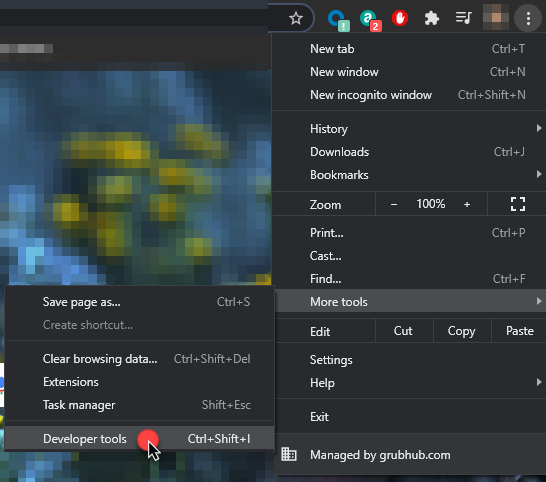
1. Select the Chrome menu at the top right, select More Tools>Developer Tools or Ctrl+Shift+I
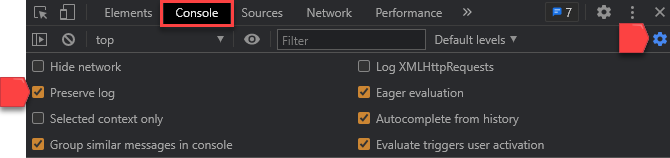
2. Under the Console option, select the gear icon, checkmark Preserve log
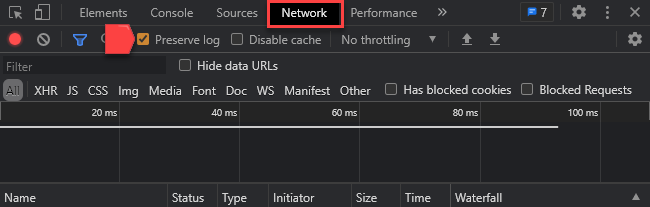
3. Under the Network option, checkmark Preserve log
4. Close the DT window or Ctrl+Shift+I again
5. Perform the actions causing the problem
6. Once the problem has occurred, do not close the window! *THIS IS THE MOST IMPORTANT STEP*
ProTip Follow these steps at the start of the affected user's shift and let the logs collect data until the very end of their shift so there is enough data logged to diagnose the issue.
7. Open Developer Tools again, select Console, if these steps were done correctly you should see a ton of log codes
8. You should see a block of text in RED, it will say something like "Uncaught Error". Right-click on it, and Save as...

9. Name the file "AgentID_ConsoleLog"
10. Select Network, click the down-arrow to export the HAR file

11. Name the file "AgentID_NetworkLog"